China
China
 Finland
 France
 Germany
 Italy
Italy
 Netherlands
 Poland
 Romania
 Sweden
 United Kingdom


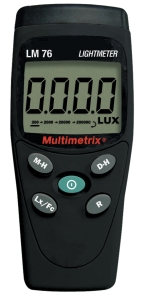

LM 76 Luxmeter
Portable digital light meter with MAX HOLD functions and remote probe.


ANDROID communication mode

Communication mode

USB communication mode
The CA 1110 luxmeter (light meter) measures the illuminance of all light sources (LED, Fluo. etc.) up to 200,000 lux in compliance with Class C of the NF C 42-710 standard. With the MAP function, you can produce a map of a surface or room in order to check that the illuminance is uniform. Because it is magnetic, the sensor can be fixed to the product for one-handed use or for easy transport, but it is also possible to use it remotely to avoid shading by the operator. The CA 1110 also offers Min, Max, Average and Hold functions, as well as allowing spot or programmable recording. The Data Logger Transfer software is available for free download to view the recorded data, configure the CA 1110, benefit from remote display and generate automatic reports.
ANDROID communication mode
Communication mode
USB communication mode
Need information about our solutions? Our experts are available to advise and assist you with your project. Contact a sales representative now for a detailed presentation and an offer tailored to your needs.
Measurement range
0.1 to 200,000 lx 0.01 to 18,580 fc
Incandescent lamp
± 3 % reading
LED
± 6 % of the reading (3000 K and 6000 K)
Fluorescent lamps
± 9 % of the reading
LED mode
± 4 % of the reading (at 4000 K)
Fluorescent mode
± 4 % of the reading (type F11, 4000 K)
Functions
Min., Max., HOLD, Average
Recording
Manual trigger and stop on the product Scheduled recording
MAP mode
The MAP function allows you to create a mapping of the illumination on a surface or in a room. The illumination measurements are thus saved in the same file.
Memory
Greater than 1 million points
Power supply
- Alkaline batteries: 3 x 1.5V LR6 or rechargeable NiMH battery - Mains connection via the power adapter / micro USB (optional)
Autonomy
500 h (portable mode) / 3 years in recording (measurement base 15 minutes)
Dimensions
Housing: 150 x 72 x 32 mm Sensor: 67 x 64 x 35 mm (with protective cover) Spiral cable: 24 to 120 cm
Weight
345 g with batteries
Protection index
Housing IP50
Operating temperature / Humidity
-10 to +60 ° C - 10 to 90 % RH
Standards
Class C according to standard NF C 42-710
Language *
Do you have a question about using or installing your measurement equipment? Our support team is available to provide you with quick and effective solutions. Contact support for personalized assistance.
Do you have a question about using or installing your measurement equipment? Our support team is available to provide you with quick and effective solutions. Contact support for personalized assistance.
Application for:
Multilingual.
Compatible with CA 1821, CA 1822, CA 1823, CA 1246, CA 1227, and CA 1110 running embedded software version 2.0 or higher.
Link: https://play.google.com/store/apps/details?id=connection.ble.com&hl=en
CAUTION : The firmware version v4.28 must be installed on the device before this update.
In order to update the Bluetooth module, you have to follow the procedure as below :
- Download and unzip the file bt122_xxxx.zip and copy BT122_xxxx.bin into the device.
- Switch on the device and press Bluetooth button.
- Wait for one minute for the PASS/FAIL message.
- If PASS message appeared, the file BT122_xxxx.bin will be renamed as BT122_FW.bin and will have to remain on the device.
- The Bluetooth module is updated.
To update your product, please first check your firmware version by holding down the following two buttons: the centre button and the MEM/REC button.
If your product has a 4.xx version, please download the 4.xx firmware.
To update your product:
PLEASE NOTE: After updating the firmware, you will need to update the Bluetooth module.
The Data Logger Transfer software allows you to control your data loggers.
The Data Logger Transfer software is a tool that enables you to:
Compatible with Windows 7, 8, 8.1, 10 and 11
Please note: DataView is not supplied with the Data Logger Transfer software
Do you have a question about using or installing your measurement equipment? Our support team is available to provide you with quick and effective solutions. Contact support for personalized assistance.
To fully meet your expectations, a range of accessories is available that is compatible with your equipment. Feel free to add them to your quote request to obtain a complete and tailored solution.

P01654110
Class C portable light meter and recorder, compatible with LED and FLUO sources, with Bluetooth and USB interfaces.
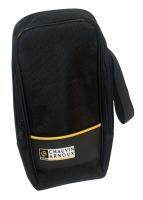
P01298075
Bag with inside pocket, hand strap and MultiFix accessory. Useful interior dimensions 120 x 245 x 60 mm

P01654253
Bluetooth 4.0 BLE dongle in USB key format for equipping a PC with a Bluetooth interface.

HX0053

P01298071
Metal case, fitted with a set of foam pads. Supplied with strap and keys. Useful internal dimensions 270x195x65 mm

P01102095
PC software for configuring, saving and processing data, editing reports, etc. for Chauvin Arnoux measuring instruments

P01654252
Shock-proof sheath for products in the CA 1110, CA 1227, CA 1246, CA 1550, CA 1821, CA 1822, CA 1823 climatic & environmental range. Protective sleeve supplied with Multifix adapter.

P01102100Z
Magnetic, articulated fixing accessory for MultiFix-compatible measuring instruments, cases and bags. Can be transported and fixed for greater ease of use.
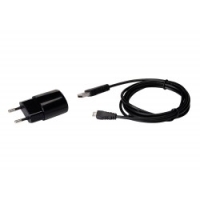
P01651023
110V-240V 50/60Hz female USB type A power adapter supplied with male USB type A/ male USB type microB cable.
Add one or more products to your quote request in just a few clicks. Our teams will analyze your needs and get back to you quickly with a personalized offer tailored to your requirements.